

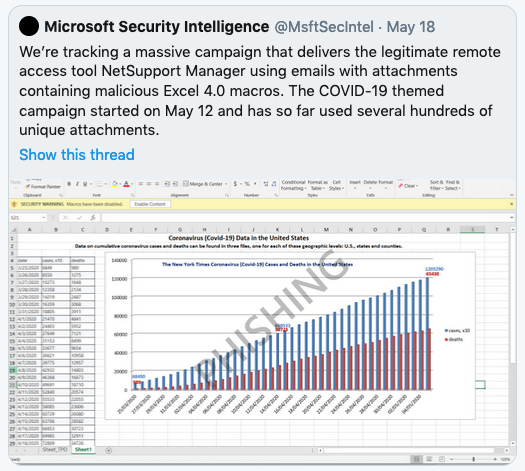
Excel spreadsheet with embedded macros
On May 18, 2020, Microsoft issued a warning about a massive phishing attack that uses a spreadsheet attachment that claims to have information about COVID-19 deaths. Unfortunately, the attachment contains a macro that tries to install a remote access tool if you allow macros to be enabled when you open the spreadsheet. This happens to be a legitimate tool that was designed with good intent. But in this case, its power is being abused by attackers in a phishing scam.
Macros have always been a risk in Microsoft Office documents, due to their power, which can be abused by an attacker. This is why you see a pop-up dialog box that asks if you want to enable macros in some spreadsheets. Macros can be OK if you know who created the spreadsheet and that it was created with good intent. However, you should never enable macros in any spreadsheet you aren’t familiar with.
[/et_pb_text][/et_pb_column][/et_pb_row][et_pb_row column_structure=”1_2,1_2″ _builder_version=”4.4.6″ custom_padding=”7px||5px|||”][et_pb_column type=”1_2″ _builder_version=”4.4.6″][et_pb_text _builder_version=”4.4.6″]Even with spreadsheets where you know the person who sent it to you, it is possible that the document could have been infected somehow. So, really, unless you know for sure that a document needs macros to run in order for it to do what you want it to do, you should not enable macros… ever. If it turns out that the document then doesn’t do what you expected it to do without the macros enabled, you should check with the creator to make sure it is OK to enable macros when using the document.
It is common for people to create documents like spreadsheets as tools and make them free for people to download from websites. This can be a nice way to contribute to a community. But you should be very cautious downloading any free documents from the web, and make sure that you don’t enable macros when using them.
[/et_pb_text][/et_pb_column][et_pb_column type=”1_2″ _builder_version=”4.4.6″][et_pb_image src=”https://clickarmor.ca/wp-content/uploads/2020/06/microsoft-excel-phishing-johns-hopkins-covid-1.png” alt=”Microsoft tweet about Excel-based phishing attack” title_text=”microsoft-excel-phishing-johns-hopkins-covid” show_in_lightbox=”on” _builder_version=”4.4.6″ width=”88.5%” custom_padding=”|||0px||”][/et_pb_image][/et_pb_column][/et_pb_row][et_pb_row _builder_version=”4.4.6″ min_height=”89px” custom_padding=”5px||11px|||”][et_pb_column type=”4_4″ _builder_version=”4.4.6″][et_pb_text _builder_version=”4.4.6″]I’ve rarely come across any Office documents that had macros that gave me problems when I didn’t enable them. So, this should be your default action. Don’t enable macros!
[/et_pb_text][/et_pb_column][/et_pb_row][et_pb_row _builder_version=”4.4.6″][et_pb_column type=”4_4″ _builder_version=”4.4.6″][et_pb_post_nav prev_text=”Previous Post” next_text=”Next Post” _builder_version=”4.4.6″ title_text_color=”#ffffff” background_color=”rgba(14,79,136,0.68)” custom_padding=”5px|10px|5px|10px|true|true” border_radii=”on|4px|4px|4px|4px” border_width_all=”1px”][/et_pb_post_nav][/et_pb_column][/et_pb_row][/et_pb_section]